Gamma AI Explained: A Comprehensive Deep Dive Into the AI-Powered Presentation Platform (2026 Review)


Table of Content
Introduction
AI Presentation Statistics
AI Presentation Market Size & Growth
What Is Gamma?
Background & Context
How Gamma Works
Core Features of Gamma
How to Use Gamma
Prompt Engineering Tips
Gamma vs Competitors
Use Cases
Gamma for Different Industries
Benefits of Gamma
AI vs Human Design
Limitations of Gamma
Is Gamma Worth It?
Accessibility & Compliance
FAQs
Common Mistakes
Gamma in the Broader AI Presentation Landscape
When NOT to Use Gamma
Final Verdict
Glossary of Key Terms
Introduction: Why AI Tools Are Changing the Way We Create Presentations
Over the last few years, almost every category of digital content creation has been reshaped by artificial intelligence. Presentation design – which traditionally required hours of formatting, layout adjustments, and slide-by-slide refinement – has also shifted toward automation. This is where AI-powered presentation tools such as Gamma and SketchBubble AI come in.
Gamma positions itself as a tool that can turn a short prompt, idea, document, or outline into a structured presentation or web-style document. Instead of manually designing slides, users can rely on AI to generate layouts, organize content, and produce a shareable final output.
In this detailed Gamma Review, we explore what Gamma is, how it works, where it fits in the growing landscape of AI PPT makers, how it compares to competitors (including SketchBubble AI), and whether it is a practical tool for professionals, students, educators, and teams.
AI Presentation Statistics
The growing interest in tools like Gamma is closely tied to broader adoption trends around AI-powered content creation. Multiple industry surveys indicate that a significant share of professionals now rely on AI to assist with writing, design, and presentation tasks. Studies on workplace productivity tools consistently show that knowledge workers spend several hours per week creating or updating presentations, making it a strong candidate for automation.
Research also suggests that AI-assisted presentation tools can reduce initial draft creation time by 50–70%, particularly for users who start from rough notes or unstructured ideas. Additionally, audience engagement studies indicate that interactive, web-based presentations tend to outperform static slide decks in terms of viewing time and content retention – especially in sales, marketing, and training contexts.
These trends help explain why AI presentation makers are increasingly positioned as productivity tools rather than design software replacements.
AI Presentation Market Size & Growth
The rise of AI presentation platforms like Gamma is part of a much larger shift in the AI productivity software market. The global artificial intelligence software market has grown rapidly over the past few years, driven by adoption in content creation, design automation, and business communication tools.
Within this ecosystem, AI-powered presentation makers represent a fast-emerging subcategory, fueled by demand from startups, educators, marketers, consultants, and remote teams. Market analysts project continued growth as organizations look to reduce time spent on repetitive formatting tasks and improve communication efficiency.
As more teams move toward asynchronous work and link-based content sharing, presentation tools that function as both documents and web pages – rather than static files – are expected to see increased adoption.
What Is Gamma? A Clear Overview
Gamma is an AI-powered presentation, document, and webpage creator designed to help users generate structured content with minimal manual design effort. The platform uses a combination of large language models and layout logic to convert user inputs into a series of “cards” – small content blocks that function like modern slides or web sections.
Unlike traditional slide-based software, Gamma focuses on:
- Fast content generation
- Automated layouts
- Web-style viewing instead of only slide mode
- Lightweight interactive elements
- Easy sharing and linking
For users who want to create something quickly without formatting slides manually, Gamma can be a convenient starting point.
Company Background & Context: Gamma’s Founders, Vision, and Market Position
Founders and Headquarters
Gamma is developed by Gamma Tech, Inc., a technology company focused on AI-assisted content and presentation tools. The platform was co-founded in 2020 by Grant Lee, Jon Noronha, and James Fox. The company is headquartered in San Francisco, California, United States.
Grant Lee, the co-founder and CEO, previously worked in finance and product roles and was inspired to rethink the way presentations are created after spending years building decks in consulting and startup environments.
Vision and Mission
Gamma’s stated objective is to simplify how ideas are expressed and shared, particularly in professional and knowledge-worker contexts. Instead of treating presentations as static slides, the company positions Gamma as a web-native content format that blends the storytelling capabilities of documents and interactive content with the traditional presentation model.
The mission centers around:
- Reducing friction in early-stage content creation
- Helping users organize structure and narrative without extensive design expertise
- Supporting modern sharing formats (e.g., web links, analytics)
These goals reflect a broader shift toward productivity tools that emphasize automation, clarity, and accessibility over manual formatting.
Milestones and Growth
Since its founding in 2020, Gamma has undergone notable developments:
- The company raised a $68 million Series B round in 2025 at a valuation of approximately $2.1 billion, led by investors such as Andreessen Horowitz and Accel.
The platform underwent major product evolution from a simple slide editor into a broader AI content creation and sharing platform over multiple product iterations.
Where Gamma Fits in the Technology Landscape
Gamma is part of a broader category of AI-assisted content and presentation tools that extend beyond traditional design software:
- Traditional Slide Tools: Microsoft PowerPoint and Google Slides remain ubiquitous for regulated or enterprise workflows that require highly controlled formatting and offline access.
- Design-First Tools: Platforms like Canva emphasize templated visual design with strong branding features and team-wide style management.
- AI-Enhanced Generators: Some tools focus primarily on AI writing or templated outputs, while others generate ready-to-edit PowerPoint templates with professionally designed graphics.
- AI Presentation Makers: Gamma distinguishes itself by combining prompt-based content generation, responsive web-native cards, and interactive embedding capabilities rather than relying on fixed slide formats.
This positioning places Gamma in an emerging subcategory of tools that emphasize rapid content generation, interactive delivery, and narrative structure without requiring users to master design software.
Brief Competitor Overview
While Gamma focuses on flexible, web-native content creation, several adjacent competitors take different approaches:
- Microsoft PowerPoint: A longstanding standard with deep customization and advanced transitions, widely used in enterprise and academia.
- Google Slides: A cloud-native alternative with strong real-time collaboration features but limited built-in automation.
- Canva: A design-centric platform with extensive templates and brand kit support, increasingly incorporating AI assistance.
- SketchBubble AI: An AI-powered presentation maker that instantly turns your ideas, keywords, or uploaded documents into fully structured and visually professional slide decks.
- Beautiful.ai: An AI-assisted slide design platform built around “smart templates” that automatically adjust layout and spacing as content is added.
- Skywork.ai: An AI workspace that combines research, writing, and presentation generation. It focuses on producing data-backed content by integrating research and structured outputs.
Each tool has strengths in specific workflows: Gamma is strongest when initial structure and rapid ideation are priorities, SketchBubble AI works well for quickly generating business-ready presentations from prompts or documents with minimal design effort, while tools like Canva and traditional slide editors may be preferred when brand consistency, deep customization, and offline editing matter most.
Gamma claims to serve tens of millions of users worldwide, with millions of pieces of content (presentations, webpages, documents) generated daily.
How Gamma Works: A Simple View of the Technology
Gamma AI’s workflow can be summarized in three steps:
1. Understanding Your Input
You can start by:
- Typing a prompt
- Pasting an outline
- Uploading a document
- Entering a URL for summarization
Gamma analyzes the material to extract structure and meaning.
2. Converting the Input into a Structured Deck or Document
The AI produces:
- Headings
- Bullet points
- Suggested visuals
- Logical flow of sections
This helps users bypass the blank-slide stage.
3. Automatically Formatting the Layout
Gamma applies:
- Themes
- Typography rules
- Spacing logic
- Card formatting
This produces a modern, minimalistic design with little manual input.
Core Features of Gamma
Gamma AI has quickly become a preferred option for users who want to avoid the “blank slide” struggle that often comes with tools like PowerPoint. Rather than treating a presentation as a static set of slides, Gamma frames it more like a living document or a contemporary webpage.
Below is an in-depth and structured breakdown of Gamma’s major features.
1. AI-Powered Generation (“Prompt-to-Presentation”)
Gamma’s headline feature is its ability to generate a full presentation draft in under a minute.
Multiple Input Methods
You can start with:
- A short text prompt
- A pasted outline
- A document upload
- A URL for AI summarization
Example prompt:
“Create a pitch deck for a sustainable coffee startup targeting B2B clients.”
Structured Narrative Output
Unlike basic AI tools that simply reformat text, Gamma generates:
- Logical sections
- Clean headers
- Bullet points
- Suggested visuals and chart ideas
This reduces time spent building structure manually.
Gamma Agent (Interactive AI Partner)
This is one of Gamma’s more notable features.
Instead of adjusting formatting menus manually, users can simply ask the AI to edit the slide.
Examples:
- “Make this card more concise.”
- “Add a pricing comparison chart.”
- “Rewrite this section in a friendly tone.”
Gamma performs the changes automatically.
2. The Flexible Card System
Gamma replaces traditional slides with a Card layout system.
Fluid Vertical Expansion
Cards grow vertically based on your content.
No need to compress text or adjust line spacing.
Responsive Design
Being web-native, cards automatically optimize for:
- Desktop
- Tablet
- Mobile
This makes Gamma presentations easy to share and read on any device.
3. Interactive and Multimodal Content
Gamma leans into the strengths of online content.
Live Embeds
You can embed:
- YouTube videos
- TikTok videos
- Spotify tracks
- Airtable sheets
- Figma prototypes
These embeds remain functional inside the presentation.
Interactive Blocks
Gamma includes:
- Toggles
- Buttons
- Callout boxes
- Tabs
This transforms a deck into something closer to a mini-website.
Advanced Data Visualization
Gamma’s data visualization tools go beyond simple charts.
They include:
- Funnels
- Pyramids
- Timelines
- Gantt charts
These elements update and resize automatically as you edit.
4. One-Click Professional Design
Gamma’s themes are built for users who may not have strong design skills.
Instant Theming
Change your presentation’s entire aesthetic – fonts, colors, and background – in one click.
Built-in AI Image Generation
Supporting models such as:
- DALL·E 3
- Flux
You can create custom visuals directly inside the platform.
Brand Kits (Pro Feature)
Pro users can upload:
- Logos
- Custom fonts
- Brand colors
Presentations then automatically adhere to company guidelines.
5. Sharing and Analytics
Since Gamma decks are hosted online, users can take advantage of features not available in traditional offline slides.
Live Link Sharing
Share a single link instead of large PPT or PDF attachments.
Viewer Analytics
For each viewer, Gamma can show:
- Whether they opened the presentation
- Which cards they viewed
- How long they spent on each card
This is highly useful for:
- Sales teams
- Founders pitching to investors
- Agencies sharing proposals
Export Options
Despite being web-first, Gamma supports exporting to:
- PDF
- PowerPoint (.pptx)
- PNG
This makes it flexible enough for hybrid workflows.
How to Use Gamma: Step-by-Step Guide
Here’s a clear walkthrough for using Gamma AI to create a presentation from scratch:
Step 1 – Sign Up or Log In
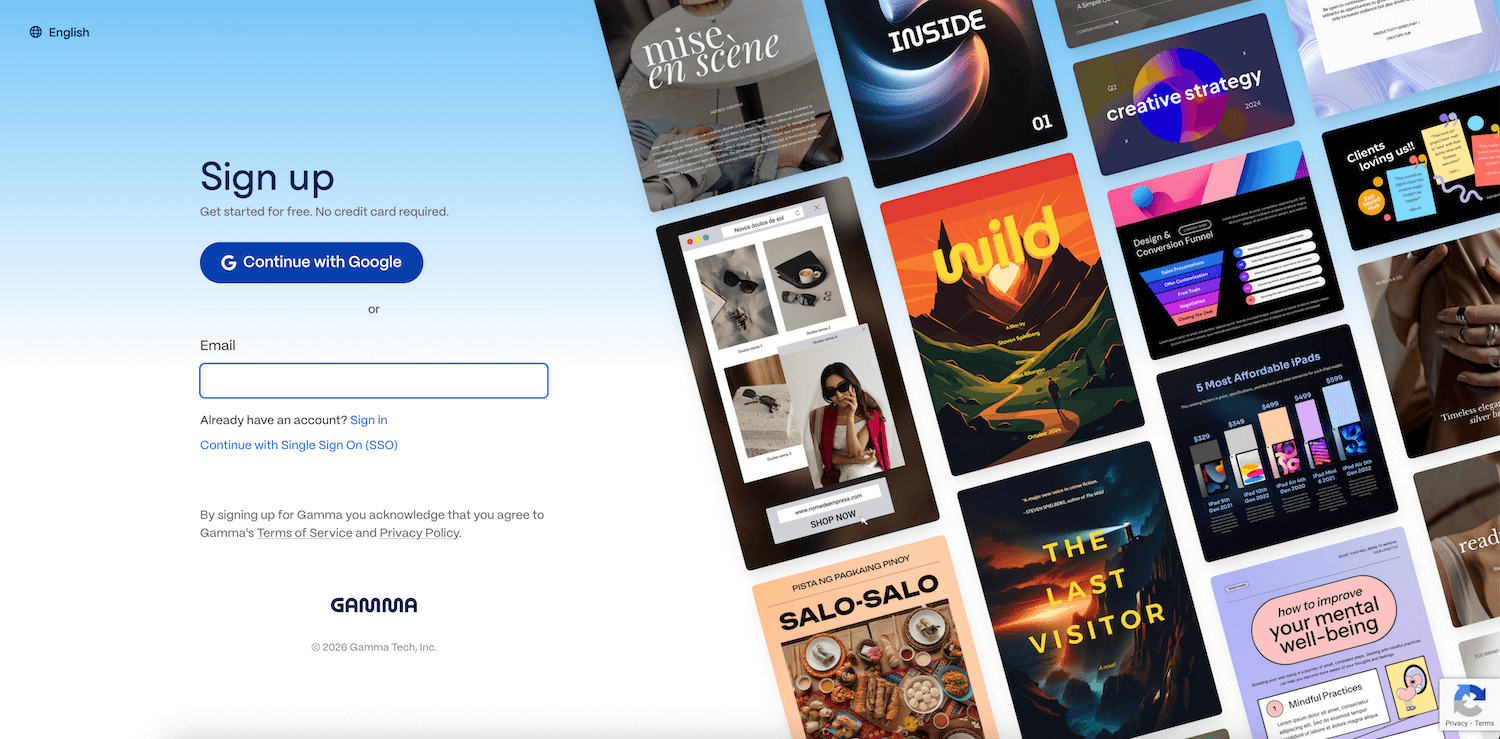
Start by creating an account. A free tier is available, and paid plans unlock additional features and AI credits.
Step 2 – Click “Create with AI”
You will have four options as in the given screenshot.
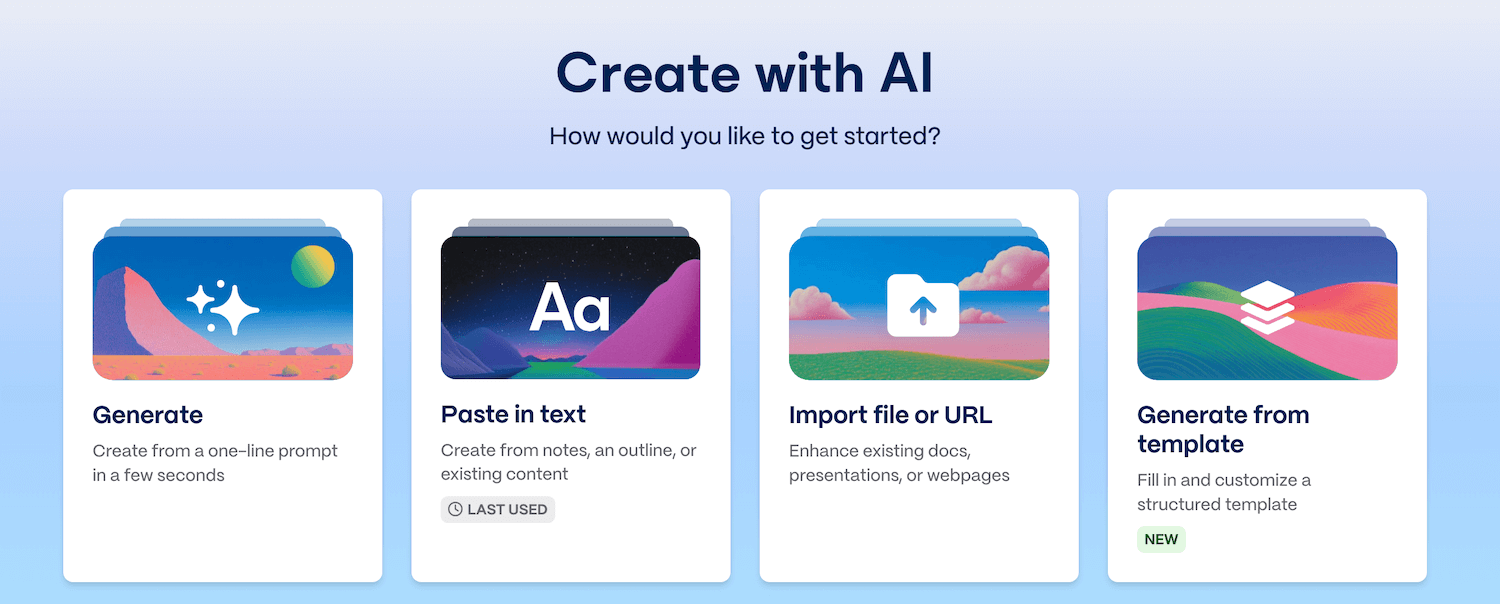
If you have the prompt ready, click the option – Paste in Text. This opens the AI generation interface. You can enter a prompt like:
“Create a 12-slide presentation about the benefits of solar energy for businesses.”
Step 3 – Choose Format
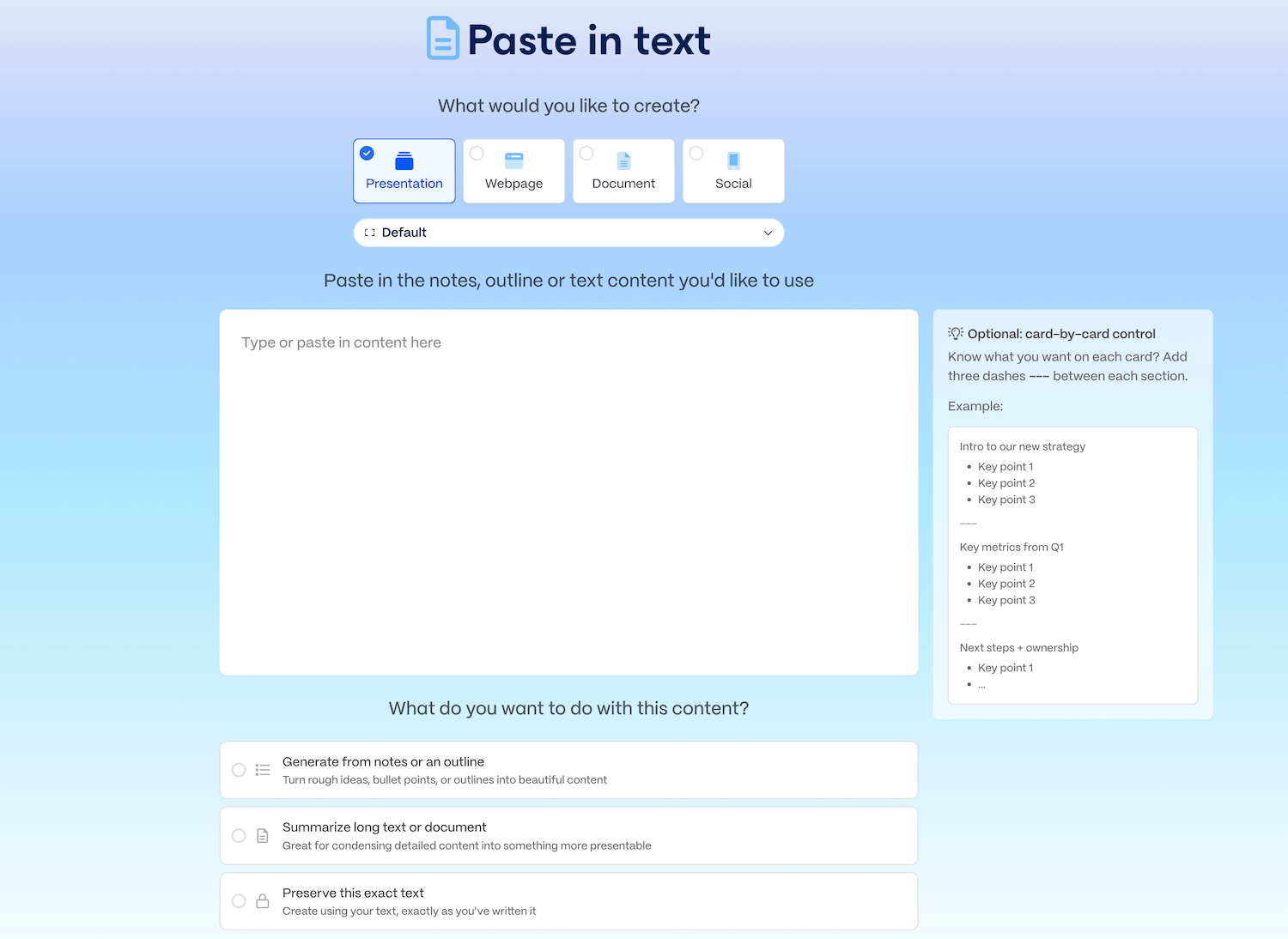
Gamma offers four formats:
- Presentation (slide-like cards)
- Document (scrollable)
- Webpage
- Social
Choose the one that best suits your purpose.
Step 4 – Review the AI Draft
Gamma will generate:
- Headings
- Bullet points
- Section structure
- Layout suggestions
Everything is editable.
Step 5 – Refine with AI Editing Tools
Gamma includes options such as:
- Rewrite
- Expand
- Shorten
- Summarize
- Change tone
This helps adjust content to your style.
Step 6 – Add Media & Interactive Blocks
Insert images, videos, accordions, tables, or galleries to improve engagement.
Step 7 – Apply a Theme or Brand Style
You can adjust:
- Colors
- Fonts
- Backgrounds
Paid plans offer brand kits, useful for teams.
Step 8 – Export or Share
When done, export the file or share it via a link.
Prompt Engineering Tips for Better Gamma Results
The quality of Gamma’s output depends heavily on how prompts are written. Clear, contextual prompts consistently lead to stronger presentations.
1. Include the Audience
Instead of:
“Create a product presentation”
Try:
“Create a product presentation for non-technical enterprise buyers.”
2. Define the Goal
State what the presentation should achieve:
- Inform
- Persuade
- Pitch
- Educate
- Summarize
Example:
“Create a 10-card presentation to persuade investors about a SaaS product’s market opportunity.”
3. Specify Tone and Depth
Add guidance such as:
- Formal or conversational
- High-level or detailed
- Data-driven or narrative-focused
4. Iterate Instead of Restarting
Rather than generating a new deck repeatedly, use Gamma’s AI Agent to:
- Condense sections
- Expand key cards
- Adjust tone
- Add missing elements
This iterative approach usually produces better results than starting over.
Gamma vs Competitors
Gamma sits among a growing field of AI presentation makers. Here is a practical comparison of how it stacks up.
Gamma vs PowerPoint
Where PowerPoint is typically preferred:
- Precision control over design
- Custom animations and transitions
- Enterprise-standard formatting
- Offline access
Where Gamma may be easier:
- Fast AI generation of drafts
- Web-based sharing
- Minimalist, modern visuals
PowerPoint remains the more robust design tool, while Gamma focuses on speed and simplicity.
Gamma vs Google Slides
Google Slides strengths:
- Simple learning curve
- Cloud-based collaboration
- Widely used in schools and companies
Gamma strengths:
- AI-driven creation
- More visually modern templates
- Interactive elements
Users who value quick AI drafts often prefer Gamma; teams focused on collaboration may stick with Google Slides.
Gamma vs Canva
Canva strengths:
- Rich template library
- Extensive graphic design tools
- Strong brand kit options
Gamma strengths:
- Stronger AI writing and structuring
- Faster deck creation from prompts
- Cleaner export options for presentations
Canva is ideal for design-heavy projects; Gamma focuses on content-first creation.
Gamma vs SketchBubble AI
Here’s a structured, balanced evaluation of both tools.
1. Design Philosophy: Web-Native vs Slide-Centric
Gamma AI – The “Living Document” Approach
Gamma breaks away from traditional 16:9 slides. Its “Card” system expands vertically, making the end product feel more like a modern website or a digital report.
SketchBubble AI – The “Polished Deck” Approach
SketchBubble takes inspiration from professional boardroom presentations. It generates structured slides that align with traditional corporate design expectations.
2. Output Quality: Aesthetics and Layouts
Gamma AI
- Minimalistic, clean, modern
- Strong for scrollable, web-based experiences
- Great for interactive storytelling
SketchBubble AI
- Corporate-style, polished visuals
- Industry-specific frameworks (Finance, IT, Healthcare)
- Better for complex diagrams and structured information density
3. Editing & Customization
Gamma AI (AI-Powered Edits)
- Chat-based edits using AI Designer
- One-click theme changes
- Restricts design manipulation to maintain consistency
SketchBubble AI (Full Control)
- 100% editable in PowerPoint or Google Slides
- A simple workflow that makes presentation creation quick and stress-free.
- Ideal for users who want precise control
4. Best Use Cases: Who Should Use Each?
Choose Gamma AI if you are:
- A startup founder
- A marketer creating internal briefs
- A creator who prefers link-based presentations
Choose SketchBubble AI if you are:
- A corporate executive
- A consultant delivering editable PPT decks
- An educator needing clear diagram-heavy slides
Use Cases: Where Gamma Helps Most
Gamma AI tends to suit users who value speed, simplicity, and a web-friendly presentation format.
Gamma works particularly well for:
1. Early-stage draft creation
Users who want a fast starting point for presentations.
2. Educators and trainers
Ideal for converting notes into structured lesson materials.
3. Marketing & sales teams
Useful for creating quick proposals, briefs, and client-friendly summaries.
4. Students & researchers
Helpful for simplifying long documents into presentations.
5. Founders & startups
Commonly used for pitch decks and presentations that require quick iteration.
Gamma may be less ideal for:
- Heavy animation
- Detailed design work
- Strict corporate branding
- Offline workflows
Gamma for Different Industries
Gamma’s flexibility makes it useful across industries, but its effectiveness varies depending on presentation needs.
Startups & SaaS
- Useful for pitch decks, product explainers, and internal updates
- Strong for fast iteration and storytelling
- Often paired with PowerPoint for final investor-facing polish
Sales & Marketing
- Works well for proposals, campaign briefs, and sales narratives
- Viewer analytics are particularly useful
- May require additional design refinement for high-value clients
Education & Training
- Effective for turning notes into structured lessons
- Interactive cards improve readability
- Less ideal for highly standardized academic slide formats
Consulting
- Helpful for early drafts and internal alignment
- Final client deliverables often require more rigid formatting and branding
Corporate Internal Communication
- Useful for project updates, strategy briefs, and knowledge sharing
- Less suitable for formal board-level presentations without additional editing
Benefits of Gamma
Gamma offers several practical advantages, particularly for users focused on speed, readability, and modern content delivery. Below is a more detailed breakdown of its key benefits.
1. Faster First-Draft Creation
Gamma significantly reduces the time required to move from an idea to a structured presentation. By generating outlines, headings, and initial content automatically, users can skip the blank-slide phase and focus on refinement instead. This is especially useful for teams working under tight deadlines.
2. Lower Design Effort for Non-Designers
Because layouts, spacing, and typography are handled automatically, Gamma lowers the barrier for users without formal design skills. The platform enforces visual consistency, helping presentations look clean and readable without extensive manual formatting.
3. Web-Native Presentation Experience
Gamma presentations are designed to live on the web. Instead of sending static files, users can share links that update in real time. This approach works well for remote teams, client sharing, and asynchronous communication.
4. Interactive Content Capabilities
The ability to embed videos, apps, charts, and interactive blocks allows Gamma presentations to function more like lightweight web experiences. This can increase engagement, particularly for sales decks, product explainers, and training materials.
5. Built-In Viewer Analytics
Gamma’s analytics provide insight into how presentations are consumed. Users can see which cards are viewed and how long viewers spend on each section. This data is especially helpful for sales, investor pitches, and client proposals.
6. Flexible Export Options
While Gamma is web-first, it still supports exports to PowerPoint, PDF, and image formats. This allows teams to integrate Gamma into traditional workflows when needed.
7. Supports Iterative Workflows
Because edits can be made quickly – either manually or through AI prompts – Gamma works well for iterative presentation development, where content evolves over multiple versions.
AI vs Human Design: What Gamma Automates – and What It Doesn’t
AI presentation tools like Gamma are often misunderstood as full replacements for human design and storytelling. In practice, Gamma works best when viewed as a design and structure accelerator, not a complete substitute for human judgment.
What Gamma Automates Well
Gamma excels at tasks that are repetitive, time-consuming, or mechanical:
- Structuring content into logical sections
- Applying consistent spacing, typography, and layout rules
- Generating first-draft text from rough ideas
- Creating clean, readable visual hierarchies
- Suggesting layouts for common presentation patterns (timelines, comparisons, funnels)
These automated capabilities remove friction from early-stage creation and help users reach a usable draft quickly.
What Still Requires Human Input
However, Gamma does not replace:
- Strategic storytelling and persuasion
- Industry-specific nuance or terminology
- Data accuracy and fact validation
- Emotional tone and audience psychology
- Final visual polish for high-stakes presentations
The most effective workflows combine Gamma’s automation with human refinement, especially for presentations meant for executives, investors, or external clients.
Limitations of Gamma
Despite its advantages, Gamma also has limitations that users should be aware of before adopting it as a primary presentation tool.
1. Limited Granular Design Control
Gamma prioritizes consistency and automation over detailed customization. Users who require pixel-level control, custom animations, or highly specific layouts may find the design flexibility restrictive compared to PowerPoint or advanced design tools.
2. AI-Generated Content Requires Review
Like all AI-powered tools, Gamma’s content generation is not always contextually perfect. Text may feel generic or require editing for tone, accuracy, or industry-specific nuance. Human review remains essential.
3. Repetitive Visual Patterns
Because Gamma relies on automated layouts and templates, presentations created with similar prompts can sometimes look alike unless users invest time in customization.
4. Cloud-Dependent Workflow
Gamma is primarily web-based. Users who need offline access or work in environments with limited internet connectivity may encounter friction.
5. Branding Features Are Limited on Free Plans
Advanced brand customization – such as custom fonts, logos, and saved brand kits – is restricted to paid plans. This can be a limitation for organizations with strict branding requirements.
6. Not Ideal for Highly Formal or Regulated Presentations
For industries that require rigid formatting standards (e.g., legal, government, or heavily regulated corporate environments), Gamma’s flexible card-based approach may not always align with expectations.
7. May Still Require a Secondary Tool
Many users find that Gamma works best as a drafting and structuring tool, with final polishing done in PowerPoint or Google Slides.
Is Gamma Worth It?
Gamma may be worth considering if:
- You frequently need quick drafts
- You prefer web-style content over traditional slides
- You want a lightweight tool instead of a full design suite
- You’re comfortable refining AI-generated content manually
It may not be the best fit if:
- You need advanced slide design and animations
- You work within strict brand guidelines
- Your organization requires offline editing
- You want polished consultant-grade presentations without additional tools
For many users, Gamma works well as a first-draft generator, while the polishing happens elsewhere (e.g., PowerPoint, Google Slides or Canva).
Accessibility, Compliance, and Security Considerations
For teams evaluating Gamma for professional use, non-functional factors matter just as much as features.
Accessibility
Gamma’s web-native format ensures:
- Responsive layouts across devices
- Readable typography and spacing
- Scroll-based consumption that reduces slide fatigue
However, accessibility compliance requirements (such as strict WCAG standards) may need to be reviewed depending on use case.
Security & Privacy
Gamma offers varying levels of privacy based on plan:
- Content remains private unless shared
- Pro and Enterprise plans include additional controls such as password-protected links
- Some plans allow opting out of data usage for AI training
Organizations handling sensitive data should review Gamma’s latest security documentation before adoption.
Compliance
Gamma is generally suitable for:
- Marketing
- Education
- Internal communication
For regulated industries (finance, healthcare, legal), additional governance checks may be required.
FAQs
Q. Is Gamma free?
Gamma offers a free plan with limited AI credits. Paid plans unlock advanced models and brand features.
Q. How do credits work in Gamma?
Credits act as currency for AI actions:
Free Plan
Free users get a limited number of AI credits to explore the platform:
- Create with AI: 40 credits to generate new decks, documents, or webpages.
- AI image generation: 2 credits per image.
- Continue with AI: 2 credits each time you use the Continue or +++ feature.
Paid Plans
Paid users unlock advanced AI capabilities:
- Chat with Agent: Uses 1–20 credits per suggestion (such as finding images or rewriting content).
- Add card with Agent: 5 credits for each new card created.
- API access: Available separately – view detailed access options and pricing on the API page.
Q. Is the content private?
Free and Plus users have private content unless shared.
Pro and Enterprise tiers offer:
- Password-protected links
- Data privacy controls (e.g., preventing use in AI model training)
Q. Does Gamma support brand fonts and colors?
Yes – as part of its Brand Kit feature for Pro users.
Q. Can I collaborate with my team?
Yes. Gamma supports Google Docs–style real-time editing.
Q. What is a Card in Gamma?
Unlike fixed 16:9 slides, Cards expand vertically and feel like a smooth storytelling experience when presented.
Q. Can Gamma export to PowerPoint?
Yes, users can export to PPTX, PDF, and Google Slides.
Q. Does Gamma replace PowerPoint?
Not entirely. PowerPoint offers deeper customization and is still standard in many organizations.
Q. Is Gamma good for pitch decks?
Gamma works well for generating quick, readable pitch deck drafts.
Q. How accurate is AI-generated content?
Gamma produces usable drafts, but human review is necessary.
Common Mistakes New Users Make with Gamma
Understanding common pitfalls can help users get more value from Gamma.
1. Treating AI Output as Final
AI-generated text often needs refinement for accuracy, tone, and clarity.
2. Overloading Cards with Content
Although cards expand vertically, dense content can reduce readability.
3. Ignoring Audience Context
Generic prompts lead to generic presentations.
4. Expecting Full Design Control
Gamma prioritizes consistency over customization.
5. Skipping Export Review
Presentations exported to PowerPoint should be reviewed for formatting alignment.
Gamma in the Broader AI Presentation Landscape
Gamma represents one approach within a growing ecosystem of AI presentation tools.
Broadly, the landscape includes:
- Template-first tools (focus on pre-designed slides)
- Slide-first tools with AI add-ons
- Content-first AI tools (like Gamma)
- Design-first platforms with AI assistance
Gamma sits firmly in the content-first, web-native category, emphasizing structure and readability over detailed slide craftsmanship. This makes it complementary rather than competitive with traditional presentation software in many workflows.
When NOT to Use Gamma
Gamma may not be the best choice if:
- You require highly customized slide layouts
- Your organization enforces strict branding rules
- You need advanced animations or transitions
- Offline-first workflows are essential
- The presentation is highly regulated or legally sensitive
In such cases, using Gamma only for early drafts – or choosing a template-driven PPT solution – may be more appropriate.
Final Verdict
Gamma serves as a practical tool for generating fast, web-friendly drafts of presentations, documents, and reports. Its strengths lie in automation, interactive elements, and ease of sharing, while its limitations mainly concern deep customization and traditional slide aesthetics.
For many users, the best workflow combines:
- SketchBubble AI or Gamma for drafting + structure
- PowerPoint or Google Slides templates for final polishing
This approach offers speed without compromising on professional quality.
Glossary of Key Terms
AI Presentation Maker –
A tool that uses artificial intelligence to generate presentation structure, content, or design automatically.
Card-Based Design –
A layout approach where content is divided into flexible, vertically expanding sections rather than fixed-size slides.
Prompt-to-Presentation –
The process of generating a full presentation from a short text prompt.
Web-Native Presentation –
A presentation designed to be viewed and shared primarily through a web browser.
Brand Kit –
A set of saved fonts, colors, and logos used to maintain consistent branding.Viewer Analytics
Metrics that show how audiences interact with a presentation, including time spent and sections viewed.